The Differences Between WiFi Locks and Wireless Locks for Commercial Security

The Differences Between WiFi Locks and Wireless Locks for Commercial Security By Gina Stuelke, CEO of Kenton Brothers

In our continuing effort to educate on the various types of locks to use and for what applications, let’s check out the differences between Wireless Locks and Wi-Fi Locks.

Wireless Locks

Wireless locks are electronic locks that communicate without traditional cabling. They use technologies like Zigbee, Z-Wave, Bluetooth, NFC, or proprietary 900 MHz wireless to connect back to a central controller, gateway, or access control system.

Advantages:

  • Battery efficiency: Most protocols are designed for low power, so locks can run for months or years on standard batteries.
  • Security-grade performance: Purpose-built wireless locks (like those from ASSA ABLOY, Allegion, or SALTO) are built for enterprise-grade access control with strong encryption and reliability.
  • Scalable deployments: Ideal for buildings with hundreds of doors where full hardwired cabling is too costly.
  • Integration with access control platforms: Often tie directly into commercial access systems (e.g., Gallagher, LenelS2, C•CURE).

Use Cases:

  • Universities and hospitals (large campuses with many interior doors).
  • Multifamily housing where unit doors need centralized control.
  • Office interiors and doors that are expensive to hardwire.

The Differences Between WiFi Locks and Wireless Locks for Commercial Security The Differences Between WiFi Locks and Wireless Locks for Commercial Security

Wi-Fi Locks

Wi-Fi locks are a specific type of wireless lock that use the building’s existing Wi-Fi network (2.4 GHz or 5 GHz) to communicate directly with the cloud or access system.

Advantages:

  • Direct cloud connectivity: No need for a special gateway; the lock connects to Wi-Fi like a laptop or phone.
  • Remote management: Easy to unlock or reconfigure from anywhere via cloud platforms or mobile apps.
  • Convenient for small systems: Great for residential or small commercial setups without enterprise access control infrastructure.

Challenges (compared to wireless locks):

  • High power consumption: Wi-Fi radios drain batteries faster, so battery life may be measured in months, not years.
  • Network dependency: Performance is tied to the reliability and security of the Wi-Fi network.
  • Less scalable for enterprise: Managing hundreds of Wi-Fi devices can strain IT networks and support teams.

Use Cases:

  • Residential smart homes (e.g., Yale, August, Schlage Wi-Fi locks).
  • Small businesses with a handful of doors and no central access system.
  • Short-term rental/Airbnb properties needing remote guest management.

The Differences Between WiFi Locks and Wireless Locks for Commercial Security The Differences Between WiFi Locks and Wireless Locks for Commercial Security

Summary

  • Wireless locks (general) = Broad category, often enterprise-grade, using low-power radio protocols (Zigbee/Z-Wave/Bluetooth/proprietary). Long battery life, reliable, scalable, often integrated with professional access control.
  • Wi-Fi locks (specific type) = Convenient, cloud-connected locks using standard Wi-Fi. Easy for small systems, remote control built-in, but higher power use and less enterprise-friendly.

The Differences Between WiFi Locks and Wireless Locks for Commercial Security

Commercial Safe Drilling Services are a Dying Art. We’ve Got You Covered

By Ryan Kaullen, Field Services Manager at Kenton Brothers

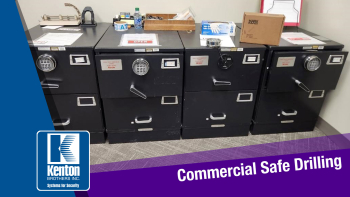
Commercial Safe DrillingSafes are made to keep items secure and for the most part they do a really good job, sometimes too good a job. When safe locks fail, get tampered with, and can’t be unlocked, you have a few options.
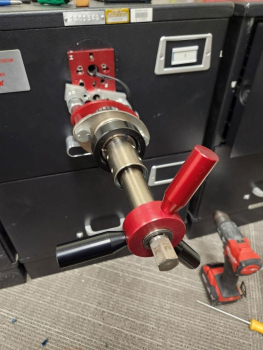
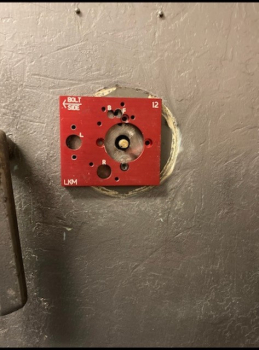
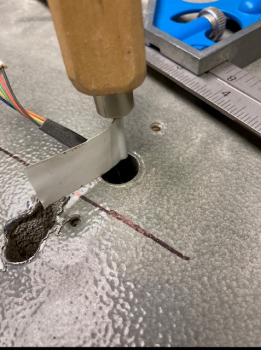
One option is having a certified and trained safe professional try to manipulate and open it using a variety of techniques. Second, depending on the type of safe, you can cut the hinges or bolts. And third, you can perform a drilling process. Using the drilling technique can take hours to even days, especially if it is a GSA high security safe.

There are preventative measures you can take to try and help avoid a safe lock from failing:

  • Preventative maintenance. Having a certified professional come on site to perform quarterly or yearly maintenance. They can assess how the safe is operating, provide proper testing, apply proper mechanical lubricants, and advise of any issues before a lock fully fails. Sometimes, locks just fail… but at Kenton Brothers we have seen time and time again preventative maintenance extending the life of the locks. This helps our clients get ahead of any potential issues with their safe(s) which helps financially in the long run.
  • Do not use WD-40 on locks. WD-40 will do more damage to your safe lock than helping it. If you want to apply the right lubricant, please contact Kenton Brothers and we would be happy to sell you the correct products to use on your safe.
  • Use the right locks for the right applications. This is a consistent issue. Our techs go on site and find safe locks that are not the correct rating, or not the right application, for their use requirements. Depending on the nature of your business, or what you are storing in the safe, there are certain requirements from a government level (GSA) that have to be met by law. We are obligated to report these situations when we find them. There are two options to resolve this situation: 1) Provide pricing to bring the safe up to standard or 2) Strip the safe of its certifications and fill out appropriate paperwork.
  • Always keep track of your safe combinations in a safe/secure location. This is an easy way to avoid service calls.
  • Make sure the company you are hiring to work on your safe/safe locks is certified. Your security provider must have experience with safe locks. Just because they are a mechanical locksmith does not mean they are certified to work on safe locks. Unauthorized fixes or attempts to fix can void warranties and cause damage to the equipment.

Commercial Safe Drilling Commercial Safe Drilling Commercial Safe Drilling

A real world story about why this matters.

Recently, we received a service call about a high security safe that was not opening. When our technician arrived on site, he found seven GSA Red Label containers. All seven had the wrong locks on them. (Remember, we are required to report these types of infractions.) We provided our customer with two options: replace all the safe locks or strip them of their certifications. The customer chose to bring one of their safes up to code and strip the rest. This was an expensive process for the customer because we had to drill one of the safes and supply the correct lock, and then do a considerable amount of government related paperwork.

Our customer could have avoided the expense of fixing incorrect locks if they had reached out to a certified GSA company when installing the containers in the first place. We would have advised them on the proper procedures and protocols. They wouldn’t have had to make the decision to decertify six expensive safes. The moral of the story is that hiring certified professionals to work on your safes may be more expensive initially, but in the long run it will be worth the investment!

We have been fortunate to work on safes of every size and level of security.

We have three GSA certified, trained, and continually educated technicians on our team. Let Kenton Brothers be the partner who keeps your safes operating correctly (or allow us to open them when you can’t!)

To schedule service of your safe please give us a call or email service@kentonbrothers.com.

Hardware Bloat: The negatives of shoehorning equipment into a system.

By Baer Halvorson, Security Systems Engineer at Kenton Brothers

Hardware BloatAs an engineer, I look at photos of doors every single day. I zoom, I scroll, I furrow my brow, I scoff, I even take an immediate coffee break at the sight of some doors. Implementing security is a never-ending song of “just when you think you’ve seen it all…” One thing I want to highlight for a brief moment is a very specific problem that isn’t normal, but is common.

The door pictured is a perfect example of how time, multiple integrators, changing needs and the lack of system sterilization can cause problems. Shoehorning as much hardware as possible onto a door to fit the current need without proper removal of unnecessary devices creates a couple of major issues. Let’s break down how this happens by identifying what causes this problem; we’ll define system sterilization and its importance in the life-cycle of physical security systems and then we’ll address what to do to be smart and thorough in protecting the future of these systems.

The Setback

Not often enough do system integrators in the physical security space or clients needing security take into consideration the life-cycle of the system. There is no problem identifying the need, the integrator can easily identify the hardware for the moment and initial set up/billing are all very fluid processes in our industry. It’s only when you get to higher-level, usually enterprise systems, that the conversation of life-cycle comes into play. When this isn’t discussed in a medium to small security system, time can end up altering door design and the system itself can shift its purpose.

Hardware BloatFor example, perhaps the parking lot gets re-designed and now a door isn’t optimal for employee entry. Maybe the hardware takes a beating and the problem surrounding a device won’t resolve easily so the integrator pitches a different solution. All of this can lead to a door like the one pictured having hardware bloat, multiple locking devices, overlapping systems and more. The greatest threat posed by this issue is that there are now two to three times the amount of failure points and this door could end up easily compromised or become a burden to the system.

System Sterilization

The single greatest way to combat the issue of hardware bloat is system sterilization.

System sterilization is when a door needs to change for system purposes and security integrators remove the old defunct hardware from the site. This might incur more cost than leaving hardware on the door because you’ll need to patch holes, cover cuts, and repair frames to satisfy aesthetics. Often, because of this cost, the choice is made to leave the existing hardware even though you’re installing a new solution. This might not seem like a big issue for one door but over time, if obsolete devices are left in the field, you end up with a system that begins to become difficult to service and confusing to manage.

If a security manager or business owner audits their security program regularly, they can incorporate system sterilization and make sure that the system is running as lean as possible. This will cut time and save money in troubleshooting, and also satisfy the aesthetic of the space. When system sterilization is considered, the life-cycle of the physical security system is improved and lengthened providing better overall security and cost savings for its users.

Future Avoidance

Hardware BloatThere are a couple ways to make sure that access control, video surveillance and intrusion systems are avoiding the issue of hardware bloat.

The responsibility falls first to the customer’s security integrator; they are being paid to not just provide hardware but provide security solutions. The next person the responsibility falls on is the individual in charge of managing the system. Between the two of them, the integrator and system manager, they should be asking these three questions at every audit or change to the system:

  1. Is there any hardware installed in the field that is not in use?
  2. Are there any areas that have redundant devices that don’t call for it? (Redundancy is not to be avoided but appropriately implemented.)
  3. Are there solutions implemented within the system that are overkill?

Conclusion

Understanding that hardware bloat can slowly creep into a system and cause issues is the first major step to making sure that a physical security system is serving its purpose. Knowing what system sterilization is and how it can extend the life-cycle of a system will improve overall security and help provide financial savings. It’s important to keep an eye on this at every audit and/or change to the system and asking how the system can be further sterilized. Applying this to physical security systems will help keep the world a safer place which is the ultimate goal of physical security!

If hardware bloat is a problem for your business, and you’re not sure how to clean it up, we can help. Give us a call!

From Legacy to Leading Edge: A visual journey through the evolution of security technology

From Legacy to Leading EdgeBy Gina Stuelke, CEO of Kenton Brothers

Back in 2008, our industry experienced a significant convergence event joining physical security and IP based networks onto a common platform. This was a major shift away from the disparate systems we had become accustomed to. That seems like such a long time ago! Today, we are involved in another convergence event involving physical security and cyber security.

The two pyramids in the images below represent the technology stacks used by Kenton Brothers, with each layer reflecting the progression of security technologies and how our offerings have elevated over time.

Kenton Brothers 2008 Technology Pyramid

Kenton Brothers Systems for Security: Pyramid1. Base Layer (Mechanical Locking Hardware): Traditional, physical locking systems.
2. High Security Cylinders and Masterkey System Implementation: The introduction of advanced physical keys and locks.
3. Legacy and Stand-Alone Access Control and Analog Video Surveillance Systems: Initial electronic security measures, such as standalone access systems, video surveillance and analog technologies.
4. Network-Based (IP) Access Control and Video Surveillance Systems: The shift to internet-based systems, improving remote access and integration.
5. Integration Services: Combining different systems (video, access control, etc.) for better coordination and ease of use.
6. Hosted and Managed Services: Outsourcing and cloud-based security management to external providers.
7. Video Analytics: Using software to analyze video data and identify suspicious activities automatically.

Kenton Brothers 2024 Technology Pyramid

Kenton Brothers Technology Pyramid1. Base Layer (Security Policies and Procedures): Security begins with robust organizational policies and procedures, a foundational aspect in modern security systems.
2. High Security Physical Hardware: Continues from previous physical security technologies but is more sophisticated.
3. Detection: Active detection systems for unauthorized access or incidents (includes sensors, alarms, etc.).
4. Access Control: Advances in access control technology (includes biometric and smart credentials).
5. Video Surveillance: Video monitoring remains central, but with higher resolution, better storage, and cloud integration.
6. Analytics and AI Support: Modern video surveillance includes AI, improving event detection and proactive analysis.
7. Cyber Hardening: Reflects the growing importance of cybersecurity, securing systems from hacking and digital threats.

What are the comparisons in technological advances?

  • Shift from Analog to IP: Over the last decade, analog systems (present in the first pyramid) have largely been replaced by IP-based systems, which allow for higher quality video and easier integration into larger networks.
  • Integration of AI and Analytics: Modern systems (second pyramid) emphasize the use of AI for proactive security management. This shift moves beyond video analytics to AI-supported threat detection, reducing human workload and improving accuracy.
  • Focus on Cybersecurity: The first pyramid lacks any mention of cybersecurity, which has become essential in modern security infrastructures due to the increasing threat of hacking. Cyber hardening in the second pyramid highlights this critical evolution.
  • Increased Use of Cloud Services: The second pyramid also reflects advances in cloud technologies for video storage, processing, and real-time analytics—leading to more flexible, scalable, and manageable systems.
  • Detection Technologies: Detection is more advanced in the second pyramid, likely including smarter sensors and automated systems integrated with AI.

Security systems have evolved from primarily physical and standalone solutions (first pyramid) to highly integrated, AI-driven, and cyber-secure ecosystems (second pyramid). These technological shifts have led to more automated, efficient, and intelligent systems capable of responding to modern-day security threats.

Has your commercial security stack been in place for a long time? It may be time to take a good look to make sure you are keeping up with the aggressive changes in technology. And if you need help, please give us a call!

Hold On To Your Keys with Key Management Software and Key Tracking Boxes

By Ryan Kaullen, Field Services Manager at Kenton Brothers

A major part of key control and building security is keeping track of your keys. That can happen in many ways including Key Management Software, Electronic Tracking Keys boxes, and risk contingency plans. All of these can work independently from each other, but also work well together. In this article, we will explore each option and how they can help you manage your keys.

Key Management Software

Key Management SoftwareKey Management Software, especially for larger companies, schools, and companies with multiple locations is a powerful way to keep track of all the keys floating around. The Key Management Software solution that we install and configure for our clients has the following capabilities:

  • Track Key issued by User.
  • Date Issued.
  • Date Expected to be returned. (Perhaps you issue a key to a vendor and that vendor will have it for a week, so you set when it should be returned, and if it is not an alert will be triggered.)
  • What Doors the key works with.
  • Department / Floor/ Bldg / etc. the key is tied to.
  • Users can add in building maps to view floor plans of doors.
  • No more tracking keys issued on paper and clipboards.
  • And More!

Understanding from the start who keys are issued to is critical in securing a facility. If that person leaves for any reason, and you don’t know what keys that individual has, and the keys are not returned, it can cause a major security problem and expose you to financial risk. This is why Key Management Software is a good solution.

Electronic Key Tracking Boxes

Key Management SoftwareOver the past decade, companies within the physical security industry have come out with electronic key tracking boxes. The idea is to secure physical keys, manage who issued keys, and make sure keys that are taken are also returned. The electronic key management boxes we install include the following features:

  • Manages who can access the box.
  • Manages what specific keys that user can have access to.
  • Integrates into a lot of access control platforms via licenses.
  • Alerts can be set up if a key is not returned.
  • Allows the ability to only issue keys as an add needed basis versus individuals always carrying keys.
  • Helps control who is allowed in certain areas.
  • And More!

Electronic Key Tracking Boxes can really help cut down on the number of issued keys, who has access and to where, who can get keys, and they also work hand-in-hand with Key Management Software for a facility.

Risk Contingency Plan

So, what happens when a key is lost? Stolen? This is going to happen at some point, and having a plan is crucial to mitigating risk, liability, and minimizing financial implications. Setting up a master key plan to help minimize risks is very important. Having a trusted locksmith partner who can come in and rekey the locks affected and using Key Management Software is a winning combination.

To learn more about these key management solutions and how we can help you take control of how you are issuing and tracking keys, please give us a call!