 By David Strickland, Vice President of Kenton Brothers
With the recent events in Uvalde, we are reminded again how critical security systems are and the role they play in protecting people, property and possessions. In Part 1 of Convenience vs. Security, we discussed some of the missteps at Robb Elementary and how those choices led to loss of life. In this blog, we will be discussing 5 things you can do today to help reduce risk in your school, business or organization.
1. Have your local law enforcement agency or trusted certified security partner conduct a thorough physical security site assessment.
This physical sight survey is part of an open and honest conversation. A thorough all-hazard threat, vulnerability, and risk assessment will take some time and involve all stakeholders or a representative from each group (Students, Staff, Administration, HR, IT, Parents, Legislatures) the more people involved the better. This assessment will review policies and procedures as well as identify the physical security components that make up your organization’s campus or grounds. It will highlight your current situation and the risks that you face. It will help you understand the common language used by industry professionals to describe risk levels and the mitigation techniques to overcome them.
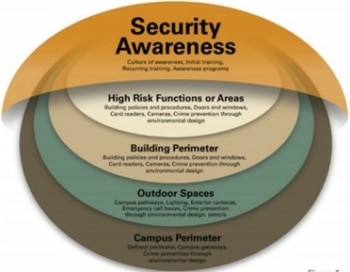 This assessment is critical for your organization to understand where it is today and where it needs to be tomorrow.
Many times these assessments can be provided for free from local law enforcement, DHS field agents or Security Partners like Kenton Brothers Systems for Security. It’s important to ask your partners about their certifications. Cost should not be a barrier. (Please call us for support.)
If you’re reading this and think you should take a crack at your assessment first; the Department of homeland Security and CISA have created an online assessment tool for you. You can find it here: https://www.cisa.gov/school-security-assessment-tool
2. Create an Emergency Plan based on the things you learned from your security assessment.
Once your assessment is finished, you will have a clear view of your physical space, the policies and procedures in place, and the risks you face with both. We encourage you to create an emergency plan, taking into consideration the items you’ve learned. This plan will cover all risks and scenarios you may face in the next year. We say year because this should be reviewed annually and adjustments made.
FEMA has created some very good tools to get you started. You can access them here:
https://training.fema.gov/programs/emischool/el361toolkit/siteindex.htm
They have also published a sample plan that will give you a template to follow. You can find that here:
https://training.fema.gov/programs/emischool/el361toolkit/assets/sampleplan.pdf
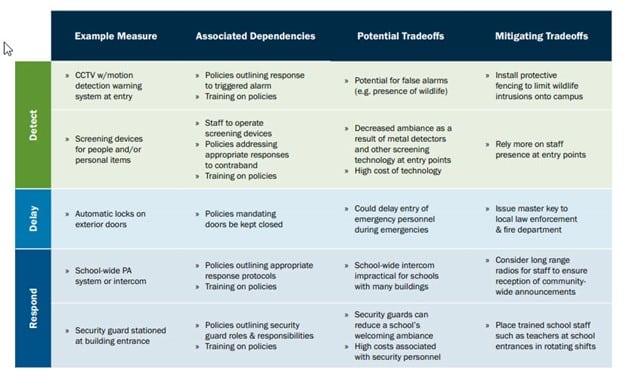
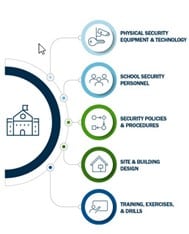 Action items might include adopting new physical security measures or improving the capacity of existing measures to detect, delay, and respond to threats across various layers of the school campus.
Plans could specify the need to provide staff with communications equipment, create policies to improve responses to safety incidents and training staff on these policies, or conduct refresher trainings so that staff and students are aware of how they should respond if and when an incident is detected.
If a school has identified in the vulnerability analysis that it lacks measures to enable quick response from first responders in case of an emergency, a plan might specify what additional measures could be in place to speed that response. The goal with the plan is to ensure consistent application of security throughout the entire campus or organization.
3. Conduct drills and monthly tests of the components in your security system.
Create a culture of preparedness among faculty, staff and students by consistently drilling each of the critical hazard responses. Fire Drills, Active Shooter Drills, Tornado, Flood, etc. Providing emergency preparedness training to team members faculty, staff and students keeps top of mind awareness. It also helps keep all layers of your organization informed. It will help you see where you need to improve and adjust your plan.
Additionally, we recommend that you test all of your access control, IP video surveillance, intrusion detection, panic devices and mass notification systems monthly to insure proper working order. We also recommend that these components are cleaned and maintained on a quarterly basis. They should have their firmware and software updated at least annually as well as with any major updates recommended by the manufacturer. Your physical security provider should be meeting with your IT department regularly (twice a year) to discuss cyber security of the physical security network to mitigate cyber threats.
Drilling, maintenance, upkeep and adjustments are critical to the successful deployment of your security plan.
4. Make snap inspections of your physical grounds at least once a month.
People respect what is inspected. Security staff or designated personnel and a member of executive or administrative level team members should conduct walk around inspections of policy and procedures on a random, but consistent basis.
Leadership should ask the following questions:
- Is my perimeter secure?
- Is my building secure?
- Are doors being propped open or forced open during school hours?
- Will our system warn us when these activities are happening?
- Who monitors the alarms that are generated when these events happen?
- What is our policy to respond to those alarms?
- Are all of my cameras running and recording high quality images?
- Have I verified how many days my recordings are saved?
- Are my cameras dirty? (At night dirt will reflect infrared light back at the lens.)
- Are all my classroom doors locked?
- Are all the emergency exits clear and unobstructed?
- Do my panic buttons work?
- Does my mass notification system work?
There are many more items we could add to this list depending on your specific scenario.
5. Partner with your local law enforcement and mental health professionals to increase awareness and outreach.
One of the sad statistics that we’ve learned over the last several years is that school or workplace violence tends to be committed by people we know. Law enforcement and mental health professionals in your area are valuable resources for assessing threat levels in human behavior. We recommend an ongoing meeting with these resources in the hopes of prevention.
One of my favorite school administration teams meets with local law enforcement, school counselors and parents to actively engage in discussions around supporting at risk youth. They call their group the “A team” and they have been very effective. By engaging early and being intentional in their support, they’ve created strong relationships with the youth, parents and teachers in their organization. The A Team has opened up communication and thwarted violent behavior before it starts.
The goal of this blog is to give you tangible steps to help you create a secure environment for your team members, students, staff, teachers, parents or customers so that they feel safe and able to thrive. If you need help going down this path, please give us a call and we will walk the path with you.
 By David Strickland, Vice President of Kenton Brothers
 Put a recurring reminder on your calendar to replace batteries.
 Point out system devices and cabling to contractors when remodeling to prevent damage or system interruption.
 Kenton Brothers Systems for Security has been in business since 1897. This year we are celebrating our 125th year! Over that time, we’ve seen our industry innovate and transform several times. Currently, we are at another crossroads of evolution and innovation.
 Administration of Access Control, IP Video surveillance, Intrusion Detection system
 Onboarding and offboarding employees
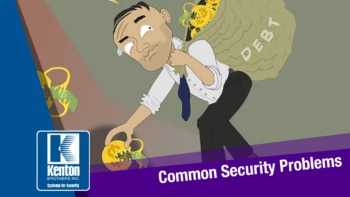 Over the last 10 years, companies, schools, churches and local government entities have invested billions of dollars in improving physical security to reduce risk and keep their people, property and possessions safe. As crime has increased, security directors and those responsible for security have done their best to meet the challenge and adapt to the threat levels they face.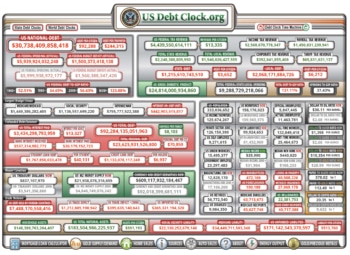
 One of the best ways to get rid of this debt is to outsource the maintenance and support of your systems. Establishing a relationship with a trusted security partner such as Kenton Brothers Systems for Security is something we would love to talk with you about. Think of us as a fractional Chief Security Officer. Kenton Brothers has manufacturer trained personnel to help maintain your investment as well as manage your daily alarms, annual firmware upgrades and ongoing operating system updates. We have certified physical security experts on staff that can help create policy and procedures for your specific situation.