Revolutionizing Secure Communication: A Deep Dive into Zenitel’s Intercom Systems

By Neal Bellamy, IT Director at Kenton Brothers

Revolutionizing Secure Communication: A Deep Dive into Zenitel’s Intercom SystemsA Legacy of Excellence

With roots dating back to 1901 and U.S. operations beginning in 1978, Zenitel has established itself as a leader in communication technology. While U.S. operations are headquartered in Kansas City, its influence spans across the country. This long-standing history and deep local connections serve as key differentiators, reinforcing the company’s reputation as a trusted provider.

Unparalleled Intercom System Features

At the core of Zenitel’s success is its commitment to superior audio quality, ensuring intelligibility and reliability in every interaction. The system boasts broad interoperability, seamlessly integrating with various access control and video management platforms. Advanced features like automatic noise reduction, auto volume adjustment, and robust cybersecurity measures make these intercoms indispensable for modern security infrastructure.

A Product Line for Every Environment

The company offers a diverse range of intercom solutions, tailored for various applications:

  • Audio-Only Stations – Simple yet effective for standard communication.
  • Video-Enabled Units – Enhancing security with real-time visuals.
  • Vandal-Resistant Models – Built for durability in high-risk environments.
  • Specialized Stations – Designed for clean rooms, explosion-proof settings, and emergency response applications.

From basic intercom stations to touchscreen models with video capabilities, the product lineup ensures customers can find the perfect solution for their needs.

A Deep Dive into Zenitel’s Intercom SystemsSeamless Integration & Strategic Partnerships

A major strength of Zenitel is its integration capabilities. The system works effortlessly with top-tier access control providers, including Gallagher and Lenel, as well as leading video management systems like Genetec and Milestone. The company is actively expanding compatibility with modern communication platforms such as Microsoft Teams and Webex, ensuring smooth collaboration across enterprises.

Diverse Applications Across Industries

Zenitel’s intercom systems serve a wide range of sectors, reinforcing safety and communication in:
Education – Securing schools and campuses.
Healthcare – Enhancing patient care and facility protection.
Government & Public Infrastructure – Supporting security and emergency response.
Manufacturing & Industrial – Ensuring seamless operations in large-scale enterprises.

With a focus on critical security needs, these intercoms are designed for high-stakes scenarios, including active shooter response and area-of-rescue emergencies.

Shaping the Future of Secure Communication

With a rich legacy, cutting-edge innovation, and a commitment to seamless integration, Zenitel is setting new standards in secure communication. Whether in hospitals, airports, corporate campuses, or industrial settings, its intercom systems provide the reliability and security organizations need to thrive.

Looking ahead, the company continues to push the boundaries, ensuring that businesses and institutions worldwide stay connected, protected, and prepared.

Is it time to upgrade your intercom system? Give us a call and we will help you determine if Zenitel is the right answer for your business.

Supercharging intercoms as part of your commercial security setup

By Neal Bellamy, IT Director at Kenton Brothers
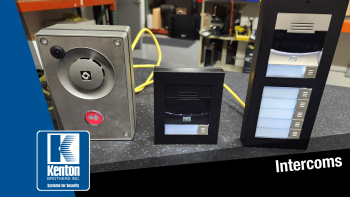
Supercharging intercoms as part of your commercial security setupI get a lot of questions about intercoms and what can be done with them as part of a robust commercial security system. Most companies secure the entrances and gates to their facility. Intercoms provide a balance between security and accessibility for visitors. Unfortunately, there can be a lot of confusion around intercoms. Including intercoms in your security setup is valuable, but you have to start with the end goal in mind. If you start down the wrong path, you may not get exactly what you want, or it might not be as easy to implement and use as you had hoped.

Intercom Options

Let’s break down your intercom options so that you can “start with the end in mind”.

First, you need to think about the door or gate where an intercom will be installed.

How much space is available for mounting? Sometimes, you may only have a thin mullion to mount to, or you might have a height restriction on a gate pedestal.

Second, will you need to have hardware options for the guest to use like calling security vs Human Resources or others?
Supercharging intercoms as part of your commercial security setupDo you need a directory listing so the visitor can call the host like what you would typically see in an apartment building? Most people want a camera on the intercom so they can see the guests, but some intercoms exist without a camera as well. The most commonly used intercom options are 1 button, 5 buttons, or a directory. Less commonly used options are a keypad, Bluetooth reader, and an induction loop.

The next thing to think about is how you want to answer the intercom.

This one is a little more in-depth but can be broken down into four options. You can mix and match as needed:

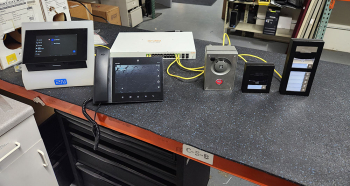
  1. Answer the intercom at a fixed location like a reception desk. You can have multiple fixed locations where an answering station like a 2N Indoor touch or a desk video phone can be placed.
  2. Answer the intercom with a mobile device. You can allow your people to roam and still be able to answer the intercom or even answer when away from the office. This is done through a mobile application or a softphone. The only thing required is network or internet access for the intercom and answering devices.
  3. Answer in an application you are already using. Several video management systems allow intercom interaction through their interface. Milestone, Genetec, and Hanwha Wave all allow you to record the video at the intercom and answer when the button is pressed. Gallagher Access control also allows you to answer and route intercoms, which is rare in the access control world.
  4. By connecting the intercom to some kind of Voice over IP (VOIP) system you can dial any phone number in the world. You do lose the video capabilities of the intercom, but you gain access to any possible number. This option is mostly used in apartment complexes or condos where you don’t want to use option 2.

The last thing to be thinking about is how you want the answering station to ring.
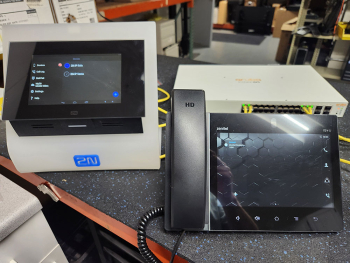
Supercharging intercoms as part of your commercial security setupYou can have several answering stations ring at the same time, you can have calls roll over when there is no answer. You can have calls routed to one answering station during a specific time and then call another answering station during a different time. Again, you can mix and match stations that ring together, roll over, and timing.

With the rise of VOIP intercoms, we have gained even more expertise, capabilities and flexibility when it comes to intercoms in your security mix. But, with flexibility, comes complication. If you need help figuring it all out, let us walk you through it.
A Tornado is Coming! Mass Notification Systems from Alertus.

AlertusBy Courtney Emra, Lead Customer Service/Sales Assistant at Kenton Brothers

Unfortunate events in recent history like the Sandy Hook and Virginia Tech shootings, Joplin Missouri Tornado, and numerous disgruntled employee and customer threats have increased the need to communicate with your staff quickly, regardless of their location. We call this “mass notification.”

Mass Notification

Present-day mass notification is different than past notification solutions, which involved dedicated locations or software that would receive an alert message. Today, mass notification systems typically include overhead speakers or paging systems to tell everyone within earshot what is happening and a lot more.

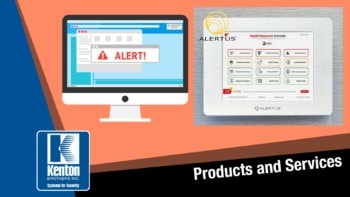
One such mass notification system is Alertus.

Alertus

The Alertus System is configurable for any situation.

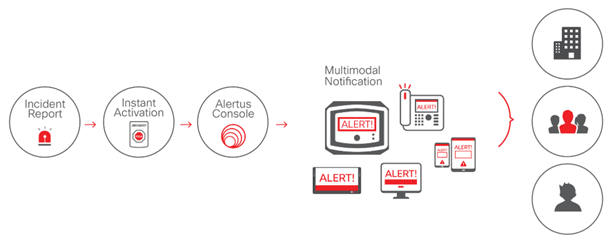
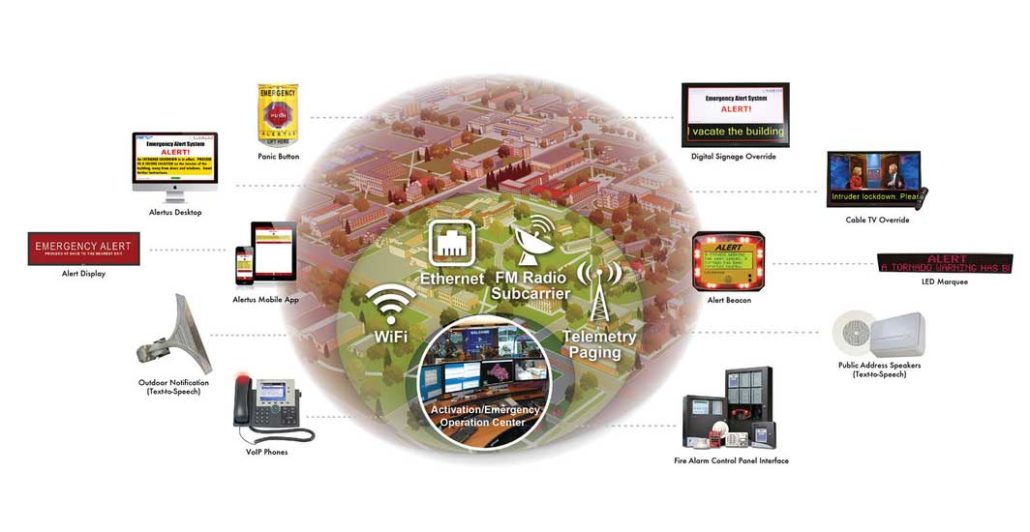
Alertus can accept alerts from devices installed in multiple locations around your building, including emergency push buttons, distress buttons under desks, hotkey commands on desk phones, fire or access control systems, NOAA weather alerts, etc. Once an alert is received, Alertus sends the specified alert to mobile or desktop applications, beacons with bright strobe lights and clear tone sounders, overhead paging or phone systems, and large outdoor speakers.

We recently installed a system for a financial company that works with consumers. They knew they could face situations like an active shooter, disgruntled employee or customer, severe weather, or a medical emergency. Each of these scenarios requires unique protocols, but regardless of their requirements, the correct information must be sent to the right people without causing unnecessary panic or confusion.

AlertusScenario 1: Active Shooter or Disgruntled Person
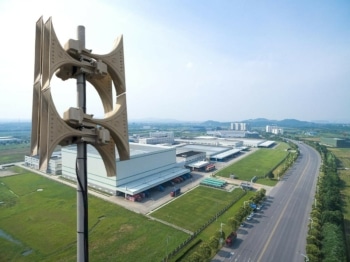
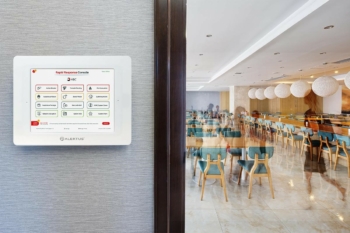
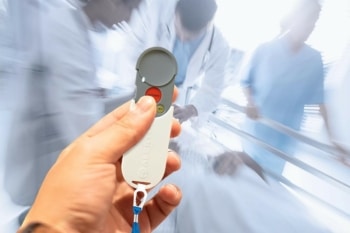
If an employee encounters a threat, they can activate the Alertus System through various devices. They include wall-mounted and wireless activation buttons, an under-desk mounted duress button, and a hotkey combination for any VoIP system.

Once activated, the Alert Beacons display a custom message and exert a sound to get people’s attention. Their overhead paging systems announce the notification through text-to-speech technology, and every computer displays a full-screen message. The system also alerts each user enrolled in their mobile Recipient Application.

AlertusScenario 2: Tornado

The system connects to NOAA weather alerts via the internet and filters the warnings by keywords, such as “tornado and observed.” Once a critical alert is received, the beacons activate a specific message and a different sound tone than Scenario 1.

A full-screen alert containing a custom text notification overrides targeted computers, and recipients can click an acknowledgment button to close the message and provide acknowledgment to safety officials. Similar to Scenario 1, users enrolled in the mobile Recipient Application are alerted.

AlertusScenario 3: Medical Alert

The gym and maintenance shed have activation buttons to enable the System in a medical emergency. The people who need to know about the medical emergency are limited, so we don’t need to send alerts to every beacon, mobile device, etc. Instead, we can send a targeted alert to the beacon that resides with the activation button to notify occupants of the emergency.

We then activate a targeted message on the computers telling the responders where the medical event is. By notifying the people who need to know and informing them exactly where the emergency is, we limit the confusion and panic of the situation while still resolving the issue quickly.

The Alertus System is highly configurable and can be customized to fit your needs. Alertus has several integrations and numerous options for each. To learn more about mass notification systems for your business or campus, call us.

Active Shooter: Real world stories about lockdowns in schools saving lives.

By David Strickland, Vice President of Kenton Brothers

On November 14th, 2017 at 7:30 am, shots ring out near Rancho Tehama Elementary in Northern California. It’s an all too familiar but tragic scenario these days. One moment children are playing on a full playground, the next, panic, confusion and the succession of two more shots. This time however, the outcome is different than some of the other school shootings you may have heard about.

The staff members of the elementary school went into lockdown mode and followed the procedures they’d practiced and drilled multiple times. The staff knew what to do, and they did it in the face of true and present danger.

The secretary immediately sent out the signal for LOCKDOWN. 

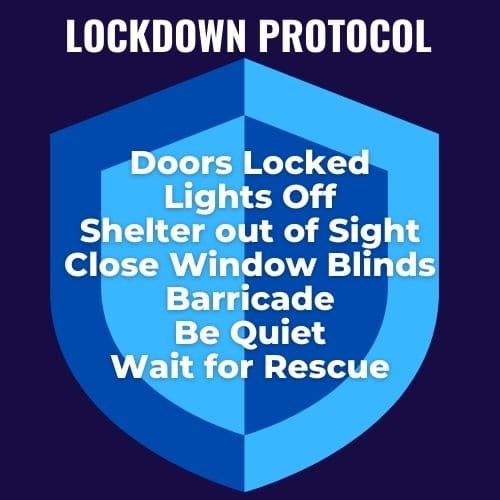
Lockdown ProtocolsStudents were rushed into the building by staff members. Family members still present in the school yard were corralled by school support personnel. Teachers and staff members locked their internal doors and barricaded external doors. They huddled in their rooms away from the windows and out of the line of sight of the shooter. Hugging each other and the most solid wall in their classroom for safety.

Within seconds, two-thirds of the school was in lockdown. An then the shooter drove his pickup truck through the school fence and barreled toward the front entrance. The school custodian was busy getting parents into the school. He paused to look and see how far away the shooter was and, “looked the shooter in the eye as the shooter shot at him.” After the shot rang out, “The shooter was struggling with his weapon at this time. The gun appeared to be jammed, and he was having trouble loading ammunition.”

The gun jamming bought the staff, kids and parents precious seconds to finish their lockdown procedure. Everyone made it inside and all access to the school rooms and offices was now secure. The shooter, now fully loaded, entered the middle quad of the school 8 seconds later.

“The school secretary recognizing the threat made all the difference between 100 kids being around today and dozens being shot or killed. Those eight seconds were critical!”

The shooter was angry and frustrated and began to shoot into the classrooms and offices. In between shooting, the gunman tried to get into classrooms and the main office, but was unable to gain entry. He checked the bathroom, which was open but empty.

One 6 year old child was injured but survived and no one was killed. Six minutes after the shooting started, the gunman drove away. Hundreds of lives were changed forever, but everyone survived.

The Rancho Tehama Elementary School staff had practiced drills and executed lockdowns before, so even though they’ve never had an active shooter on campus, they knew what to do. It had become second nature.

The superintendent said, “The lockdown procedure was implemented flawlessly. The reason that we have a situation where I have one student injured on campus and nothing worse happening on campus is because of the heroic actions of all members of my school staff.”

Oxford High School in 2021

Lockdown ProtocolsThe same techniques and lockdown training were used in Michigan at Oxford High School on November 30, 2021.   Just after lunch, shots rang out inside the school in the main hallway. A 15 year-old student opened fire on his classmates. School staff, students and parents in the school that day followed the LOCKDOWN call and began to follow their training. “They had drilled this exact scenario so much that everyone knew exactly what to do next.”

In the hours after the shooting outside Detroit on Tuesday, Oakland County Sheriff Michael Bouchard said that without the measures taken by students, the tragedy would have been worse. “It is also evident from the scene that the lockdown protocols, training and equipment Oxford schools had in place saved lives.”

David Riedman, lead researcher on the K-12 School Shooting Database, said that the lockdown procedures that were deployed in Oxford, in which students sheltered and stayed out of sight, “absolutely saved lives.” The training that appeared to be on display in Michigan is similar to what students all over the country are taught, he said.

LOCKDOWNS took on new meaning during the heights of the COVID-19 Pandemic. 

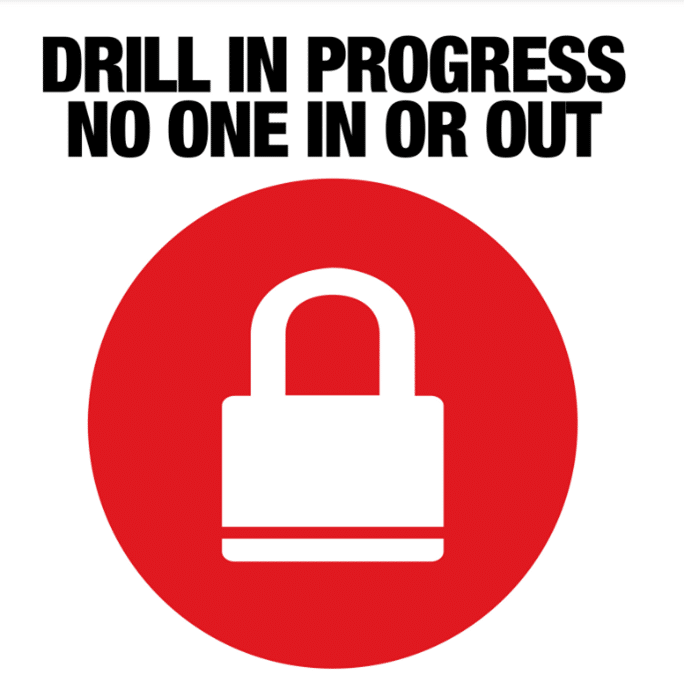
Lockdown ProtocolsIn the physical security world, lockdowns mean locking down a building so that no one can enter or leave for a period of time. The location stays locked down until an all-clear signal is given. This seems like a pretty straight forward premise. It is – IF you plan correctly and have the right systems and procedures in place to make a LOCKDOWN effective.

Kenton Brothers uses several access control platforms to make it easy and quick to lock down a school. When a panic button is pressed, all the school doors lock. And alarms and mass communications go out audibly through speakers and electronically through mobile devices and computers throughout the school.

One of our manufacturers, Gallagher, allows you to not only lock down the school, but also send out emergency messaging to any staff members or parents who are not at the school. This would allow them to stay away or help support police in their efforts to bring the situation under control. Gallagher also has the ability to remotely muster or check off each person from a pre-determined list to be sure 100% of the people on-site are accounted for. This is a powerful benefit in the aftermath of these incidents.

Police can also remotely operate and IP Surveillance cameras in the building to gain situational intelligence on the location of the shooter and the direction they’re headed. This is just one example of how these security systems can help support the training, processes and procedures during a Lockdown situation.

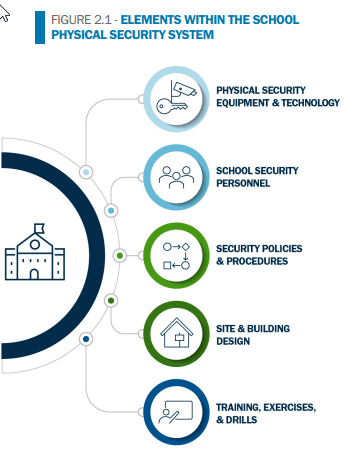
Kenton Brothers Systems for Security helps guide schools and other entities through the process of identifying risks around active shooters and the techniques in protecting your people, property and possessions. Kenton Brothers’ qualified consultants will perform a no cost physical security assessment with recommendations for security system components, processes and procedures that will help prepare your staff. Just give us a call.

Additional Resources

CISA K-12 School Security Guide, 3rd Edition

A Tornado is Coming!

By Neal Bellamy, IT Director at Kenton Brothers

Unfortunate events in recent history like the Sandy Hook and Virginia Tech shootings, Joplin Missouri Tornado and numerous disgruntled employee and customer threats have increased the need to communicate with your staff quickly, regardless of where they are located. We call this “Mass notification.”

Mass Notification

Mass notification is different than past notification solutions. Previous solutions involved dedicated locations or software that would receive an alert message. Mass notification typically includes overhead speakers or paging systems to tell everyone within earshot what is happening, and a lot more.

One such mass notification system is Alertus.

Alertus


Alertus can accept alerts from emergency push buttons installed in various locations at your building, distress buttons at desks, hotkey commands on PCs, fire or access control systems, NOAA weather alerts, etc. Once an alert is received, Alertus can send the specified alert to mobile or desktop applications, beacons with strobe lights and sounders, overhead paging or phone systems, and large outdoor speakers. The Alertus system is configurable for any situation.

We recently installed a system for a financial company that works with consumers. They knew that they could face situations like active shooter, disgruntled employee or customer, sever weather, or a medical emergency. All of these scenarios should be handled differently to get the right information to the right people without causing unnecessary panic or confusion.

Scenario 1: Active Shooter or disgruntled person

If an employee encounters a threat, they can activate Alertus. There are wall mounted buttons, an under desk mounted duress button and a hotkey combination for any computer that is logged in that can send the alert. Once activated, all alert beacons show a customer message and make a sound to get people’s attention. Their white noise system and overhead paging systems are used to announce the customer message. Every computer has the message displayed full screen. And the message is sent to each user that has enrolled their mobile application.

Scenario 2: Tornado

The system is connected to NOAA weather alerts via the internet. The system filters the alerts by multiple keywords, such as “tornado” and “observed.” Once an important alert is received, the beacons are activated with a specific message and a different sound than scenario 1. The computers display a full screen message and the mobile applications are alerted.

Scenario 3: Medical Alert

Buttons are placed in the gym and maintenance shed in the event of a medical alert. The people that need to know about the medical emergency is limited, so we don’t need to send alerts to all of the beacons, mobile devices, etc. Instead, we send the alert to the one beacon that resides with the button, to let the person know the system was successfully activated. Then we show a message on the computers of the people that need to be alerted. The message displayed tells the responders where the medical event is located. By only notifying the people that need to know, and telling them exactly where the emergency is, we limit the confusion and panic of the situation, while still resolving the issue quickly.

The Alertus system is highly configurable and each scenario can be customized to fit your needs. Alertus has several integrations and lots of options for each one. If you would like to learn more about mass notification systems for your business or campus, please give us a call.